TL;DR
- I opened OpenAI Ads (beta) for three US-market wholesale nail-supply Shopify stores I run, wired the whole thing through the Ads Management API, and handed day-to-day operation to an AI agent (Claude Code). This is the honest build log, not a launch hype piece.
- The first thing a new account does is auto-create a campaign you never asked for. On two stores those default campaigns quietly burned $255 and $253 at ~$3.50-4.00 per click, zero orders, zero tracking before I paused them.
-
Two things actually work: a product feed (a full-catalog
.jsonl.gzpushed over SFTP that OpenAI ingests) and server-side conversions (CAPI). The feed is the real prize because it also feeds free organic ChatGPT shopping traffic. - Paid results so far: after roughly $1,100 of beta spend across every campaign in this post, 0 cleanly-attributable paid orders. Meanwhile the same feed drove 24+ free organic ChatGPT orders in 30 days (single orders up to $155). The paid side has a hard measurement wall: OpenAI overwrites your UTMs.
- If you sell physical products on Shopify: set up the feed and CAPI now, skip the paid card campaigns until the economics and attribution mature. Full reasoning, numbers, and the exact API calls below.
A note on names: the three stores are real accounts I operate, but I’m keeping their brand names out of this post to keep my business side separate from this notebook. Everything else, the numbers and the API calls, is exactly what I ran. I’ll call them Store A, Store B, and Store C.
What’s in here
- The setup, and why I let an agent run it
- Signup and verification
- The default campaign that spends before you do
- Talking to the Ads API (and the Cloudflare wall that eats Python)
- The conversion key, and two systems people confuse
- The product feed, the part that actually earns
- Campaign type 1: the product card (chat_card)
- Campaign type 2: the feed campaign
- Letting the AI do the work
- What actually happened: three reversals in ten days
- The numbers, side by side
- The rejected-ads trap that is not your fault
- Where I’m stuck today
- Verdict, and FAQ
The setup, and why I let an agent run it
I run performance marketing for three wholesale nail-supply Shopify stores aimed at the US market. Google Ads, Meta, Klaviyo, Shopify, every day. I am not a trained developer. I vibe-code small tools with AI to run my own stack, and I publish what I build.
When OpenAI opened its Ads Manager beta with a real Ads Management API, I did the thing I always do: I stopped reading the announcement and tried to wire it up myself. The twist this time is that I did not operate it by hand. I gave Claude Code, the command-line AI agent, standing authority to build the tooling and run all three accounts, while I keep the budget policy and sign off on anything that moves money.
That division of labor matters, so I will be blunt about it up front. The agent is very good at the mechanical work: writing the feed builder, handling the API quirks, pulling and reconciling numbers. It is not a substitute for a human reading the results with suspicion. Half of this post is the agent being confidently wrong for a day, then me (or the raw numbers) catching it. That is the honest shape of the thing.
Signup and verification
Signup is what you expect. You create an Ads Manager account per store, connect the store domain, and go through a business and domain review. Each store gets its own ad account with an id shaped like adacct_..., a currency (USD for me), and a timezone that is fixed to America/Los_Angeles regardless of where you sit. Mine sits in Hanoi, so every report I read is in Pacific time. Small thing, but it bites you later when the insights API refuses any time range that ends in “the future” by Pacific clock.
Verification is a review step. The account flips to active with the review marked approved. Nothing exciting, except one detail that becomes a theme: the review system in this beta is twitchy, and it re-reviews your ads on an ongoing basis, not just once. More on that when we get to rejected ads.
The default campaign that spends before you do
Here is the first real lesson, and it costs money.
When you open an OpenAI Ads account, it does not sit idle waiting for you. It auto-creates a starter campaign with your store name on it, and it can start spending. These were not campaigns I designed. They were cost-per-click campaigns with no conversion tracking attached, bidding far too high for a physical-goods margin.
| Auto-created “default” campaign | Bid | Spent | Orders | Tracking |
|---|---|---|---|---|
| Store B “…Nail Supply campaign” | $4.00 / click | $255 | 0 | none |
| Store C “…Nails campaign” | $3.50 / click | $253 | 0 | none |
Source: my own OpenAI Ads accounts, campaign insights. First-party.
Over $500 gone across two stores, on campaigns I did not create, for zero orders. If you take one operational thing from this post, take this: the first action on any new OpenAI Ads account is to list campaigns and pause anything you did not build yourself. By API that is two calls:
GET  /v1/campaigns?limit=50
POST /v1/campaigns/{id}/pause
The agent now does this automatically before it creates anything. It should have done it on day one. It did not, and the bill is above.
Talking to the Ads API (and the Cloudflare wall that eats Python)
The API is documented at developers.openai.com/ads. The essentials:
- Base URL:
https://api.ads.openai.com/v1, Bearer auth. - Key: a service key shaped like
sk-svc..., scoped to one ad account, created in Ads Manager under Settings then API Keys. One key per store. This is the “Ads Management” key. It is not the conversion key. That confusion is common enough that I gave it its own section below. - Object model: campaign then ad group then ad. Same mental model as every other ad platform.
- Reads:
GET /ad_account,/campaigns,/ad_groups,/ads, each withlimit(1-500),after,before,order. - State changes:
POST /campaigns/{id}/activate | pause | archive. - Rate limit: 600 requests per minute per endpoint, 1200 total. Generous.
Then the gotcha that cost me an afternoon. If you call this API from Python with the default urllib or requests user-agent, Cloudflare blocks you with Error 1010, “browser_signature_banned”, before the request ever reaches OpenAI. It is a user-agent ban, not an auth problem, so the error looks nothing like what is actually wrong. The fix is trivial once you know it: use curl, or set a browser or curl user-agent on your Python request.
req.add_header("User-Agent", "curl/8") # without this, Cloudflare 1010 kills itCreating a campaign is one POST. This is the real body the agent sends, trimmed:
POST /v1/campaigns
{
  "name": "Store A Chat Cards CPM",
  "status": "active",
  "bidding_type": "impressions",
  "budget": { "daily_spend_limit_micros": 100000000 },
  "targeting": { "locations": { "include": [
      { "id": "1000232", "type": "country", "country_code": "US", "name": "United States" } ] } },
  "conversion_event_setting_ids": ["<event-setting-id>"]
}
Budget is in micros: 100000000 is $100.00 per day. Hold that thought, because the insights API returns spend in dollars, not micros, and mixing those two units up is exactly the bug that made my reports lie to me for a week. I will come back to it.
The conversion key, and two systems people confuse
OpenAI Ads has two separate credential systems, and the naming does not make it obvious:
- The Ads Management API key (
sk-svc...) creates and edits campaigns. It spends money. - The conversion key is a different key for the Conversions API (CAPI), the server-side pipeline that reports purchases back to OpenAI. You manage it under a separate “Manage conversion keys” button.
They are not interchangeable, and the endpoints live on different hosts. Here is how measurement actually gets wired.
First, you attach a conversion event to a campaign. You read the available events:
GET /v1/conversions/event_settingsThat returns an order_created event (“Order Created”, 30-day attribution window, tied to a pixel). You attach it to a campaign with the conversion_event_setting_ids field you saw above. Done at create time, it costs nothing and changes no spend. It is pure measurement.
Second, the server-side feed of real purchases. This is CAPI, and it lives on a different host:
POST https://bzr.openai.com/v1/events?pid=<PIXEL>
Authorization: Bearer <conversion-key>
A few things I learned the hard way:
- Amounts are in cents, not dollars.
- Dedup is by event id, and I use the Shopify numeric order id for that so a purchase can never be counted twice.
- User identity is hashed:
user.email_sha256 = sha256(lowercase(email)). - It supports
validate_only, which returns{"accepted_events": 1}so you can test without polluting real data. - Unlike the ads API,
bzr.openai.comdoes not block Python, as long as you still set a user-agent header.
The agent deployed this as a small cron on a cheap VPS. Once an hour it reads new Shopify orders, hashes the email, and posts the events, with incremental state, a 30-minute overlap so nothing slips through a boundary, and a 7-day window. The initial backfill sent 614 orders for the first store. I also have a Shopify custom pixel as a client-side option, but I deliberately do not let it fire order_created, because then CAPI and the pixel would double-count the same purchase.
The product feed, the part that actually earns
If the paid campaigns are the loud part of this platform, the feed is the quiet part that pays. It deserves the most attention, and it got the least in every tutorial I read.
The feed is a full-catalog snapshot as a gzipped JSON-lines file (.jsonl.gz), one product-variant per line. For the first store that is about 19,700 products and 27,100 variants. You do not POST it to the API. You push it over SFTP (secure file transfer) to OpenAI’s ingest host and overwrite the same filename each time:
host: sftp.commerce.openai.com   port: 443
file: <your-feed-id>.jsonl.gz    (overwrite in place)
When ingest succeeds, OpenAI drops a status.json at the SFTP root that reads {"status": "success"}. That is your health check.
The builder the agent wrote does three useful things:
- Pulls the live Shopify catalog and writes only in-stock variants as
is_ads_eligible. Out-of-stock items stay in the catalog but stop advertising. When they restock, the next refresh turns them back on. No manual toggling. - Appends UTM parameters to every product URL (this part turned out to be futile, and I will explain why in the reversals).
- Marks items
is_eligible_search, which is the flag that lets your products show up on ChatGPT’s organic shopping surface, the free one.
A cron rebuilds and re-uploads the full snapshot every 12 hours. The whole thing runs unattended. And here is the punchline I did not expect: that organic eligibility, the free surface, is where almost all of my real revenue from ChatGPT has come from. The feed is worth maintaining even if you never run a paid campaign.
Campaign type 1: the product card (chat_card)
The first paid format I built is the chat card: a single card with your image, a headline, and a click-through URL, shown inside a ChatGPT conversation. It is created like this, and the only genuinely non-obvious step is the image upload.
You upload the image by URL, not multipart, and get a file_id back:
POST /v1/upload { "image_url": "https://.../collection.jpg" } -> { "file_id": "..." }Then campaign (CPM / impression-billed), then an ad group carrying context_hints (an array of situation strings like "restocking DND for a salon" that steer where the card shows), then the ad:
POST /v1/ads
{
  "ad_group_id": "<ag>",
  "status": "active",
  "creative": {
    "type": "chat_card",
    "title": "OPI Nail Colors at Wholesale",
    "body": "Shop OPI gel and lacquer shades at wholesale prices.",
    "target_url": "https://store.example/collections/opi?utm_source=chatgpt&utm_medium=cpc&utm_campaign=openai_opi",
    "file_id": "<file_id>"
  }
}
I built one ad group per collection theme, six per store, each with its own image, its own context hints, and a per-theme UTM so I could measure return on ad spend per theme. It was a clean design. It also did not survive contact with reality, for a reason that had nothing to do with the design.
Campaign type 2: the feed campaign
The feed campaign is different: instead of one hand-made card, OpenAI generates ads from your feed products automatically. The creative is a template, and you get almost no control over it:
POST /v1/ads
{
  "creative": {
    "type": "product_ad_template",
    "title": "Wholesale Nail Supply Deals",
    "body": "{{product.body}}",
    "price": "{{product.price}}"
  }
}
Only title is yours to write. body must be empty or the literal {{product.body}}, and price must be {{product.price}}. Image, URL, and description are all pulled per-product from the feed. The ad group uses a product_set pointed at the whole feed, and because the feed already marks only in-stock items as eligible, “the whole feed” automatically means “everything in stock right now”.
In the beta, both campaign types are impression-billed only. There is no click or conversion bidding yet. That single constraint drives most of the economics you are about to see.
Letting the AI do the work
Here is the split, concretely.
The agent (Claude Code) owns the mechanical layer. It wrote the feed builder and uploader, the CAPI sync, and the campaign-creation scripts. It lists and pauses stray campaigns, HEAD-checks every landing URL before it builds an ad, spaces out ad creation to avoid tripping the crawler, resubmits ads that get wrongly rejected, and pulls insights. It sends me a return-on-ad-spend report to Telegram at 8am my time, every day.
I own the judgment layer. I set the budget policy ($100/day/store to start, scale up only when return on ad spend clears a real threshold). I decide creative direction. And critically, I sign off before any change that moves money. Building structure and reading numbers is free and reversible. Turning on spend is not, so that stays a human decision.
This is the part I want other operators to copy, and also the part I want to warn you about. An agent will happily build you a beautiful, wrong thing at scale. Twice in ten days, the agent handed me a confident conclusion that the raw numbers later contradicted. The value is not “the AI runs my ads”. The value is “the AI does ten hours of plumbing in ten minutes, and I stay paranoid about the results.”
What actually happened: three reversals in ten days
This is the honest middle of the story. In roughly ten days I reversed three conclusions. I am showing them because the reversals are the actual lesson, and because a build log that only shows the clean version is lying to you.
Reversal 1: “the feed campaign does not serve” became “the feed campaign serves”
On day one of testing, I ran a controlled comparison inside one account: same budget, same $7 CPM, same period, chat card versus feed campaign. The chat card delivered 1,641 impressions. The feed campaign delivered zero. Same result across all three stores, ads approved, config correct. There was no diagnostic endpoint to query (every guess like /feeds/{id}/status returned 404). I concluded OpenAI had simply not switched on the feed placement yet, and I told myself to stop funding feed campaigns.
Two days later I turned a feed campaign back on to re-test, and it ran: 4,762 impressions, 123 clicks, $81.43, 2.58% click-through, $0.66 per click over two days. OpenAI had enabled the feed placement sometime in that window. My earlier conclusion was correct for the day I made it, and wrong 48 hours later, because the platform changed underneath me. In a beta, “it does not work” has a short shelf life. Re-test before you trust an old finding.
Reversal 2: “CPM is 20x cheaper than CPC” became “CPM collapses at scale”
Early on, my small chat-card sample looked like an arbitrage. At a $7 CPM with a 4.8% click-through rate, I was effectively paying $0.145 per click, while the cost-per-click campaigns were charging $2.68 to $3.52 per click. Buy by impression, harvest the clicks, win. I was briefly very pleased with myself.
Then it ran at real scale and the click-through rate fell off a cliff, from 4.8% on 1,641 impressions to about 0.45% on 12,000. At that click-through rate a $15 CPM works out to roughly $3 per click, which is worse than the auto CPC campaigns I killed on day one. The $0.145 was a mirage from a sample too small to mean anything. Do not price a channel off its first 1,600 impressions.
Reversal 3: the measurement wall (this one did not reverse, it just got worse)
I designed the whole thing to measure return on ad spend per campaign theme, using utm_campaign=openai_<theme> on every URL. It was wasted effort. OpenAI overwrites your UTMs.
I pulled 30 days of Shopify orders tied to ChatGPT and looked at what actually arrived in the session. Every one showed utm_medium = feed or empty, never cpc. utm_campaign was always None. The source came through as “ChatGPT” or “https://chatgpt.com/”. My per-theme tagging scheme was erased before the click ever hit my store. Which means the tidy report bucket I built, “paid = utm_source=chatgpt and utm_medium=cpc”, will read $0 forever, even while ads are spending. That zero is a measurement artifact, not proof the ads failed. If you build this, do not let a false zero convince you to keep spending, or to stop.
The numbers, side by side
Here is the paid side at real scale, first-party from my own accounts:
| Chat card (CPM $15), 2-3 day window | Impressions | Clicks | Spend | CTR | Effective CPC |
|---|---|---|---|---|---|
| Store A | 11,977 | 51 | $176.70 | 0.43% | $3.46 |
| Store B | 11,530 | 56 | $170.00 | 0.49% | $3.04 |
| Store C | 11,971 | 62 | $177.00 | 0.52% | $2.85 |
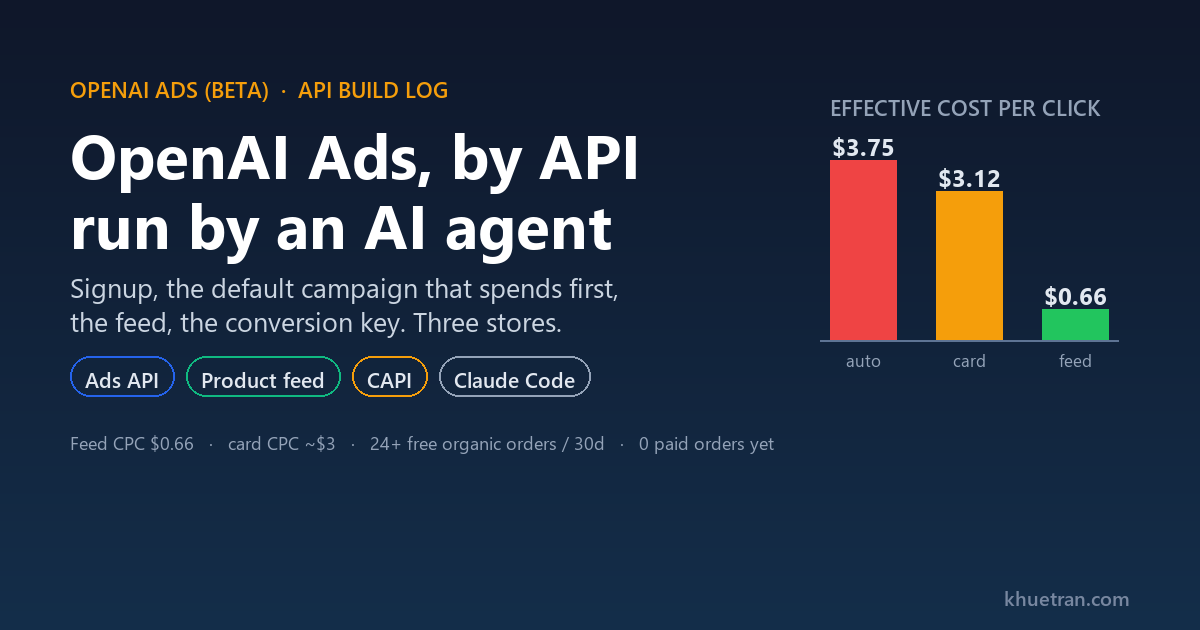
| Feed campaign (Store B), 2 days | 4,762 | 123 | $81.43 | 2.58% | $0.66 |
Source: OpenAI Ads insights, my three accounts. First-party.
The gap is the whole story. The feed campaign gets a 2.58% click-through rate and a $0.66 click. The chat cards get roughly 0.45% and a $3-ish click for the same audience. Here it is as a chart:
Now the part that reframes everything. Paid orders cleanly attributable to those clicks: zero. About 292 paid clicks over two days produced no attributable purchase across all three stores. But the free organic ChatGPT surface, the one the feed unlocks, has been quietly selling the whole time:
| Organic ChatGPT (free, via feed), 30 days | Orders | Notable order values |
|---|---|---|
| Store A | 14 | $129.04, $101.78 |
| Store B | 10 | $155.47, $110.79 |
| Store C (newer, smaller) | fewer | $38.25 |
Source: Shopify orders with source = ChatGPT, my three stores. First-party.
Two dozen free orders in a month against zero paid orders. That is not an argument to abandon the platform. It is an argument about which surface to invest in right now: the feed, not the cards.
One caveat I owe you, because the honest version includes it. Zero paid conversions is not proof the paid ads sold nothing. CAPI is alive (validate returns accepted for all three stores), but OpenAI has to match a ChatGPT user’s identity to a checkout email to credit a conversion, and that match is genuinely hard. So “0 paid orders” is partly a real result and partly an attribution gap I cannot fully close from my side. I am telling you the number and the reason it might understate reality. A confident wrong number is worse than a labeled uncertain one, because you act on the confident one.
The rejected-ads trap that is not your fault
You will see ads get rejected with “Landing Page issues found, Error code 404”, and you will assume your URL is broken. Read the ad object’s review: {status, reason} field before you assume anything. In one batch, 13 rejected ads broke down as 9 robots_txt, 3 crawler_502, and 1 crawler_503. That is 100% infrastructure, 0% content.
I verified from my side: robots.txt allows everything, the pages return 200 with a healthy time-to-first-byte, and only a completely empty user-agent gets a 403. The real cause is that OpenAI’s review crawler gets throttled intermittently by the store’s edge (Shopify sits behind its own Cloudflare, which is not a zone I control). When a robots.txt fetch fails, a whole cluster of ads submitted in that pass drops together. Ads flap: approved yesterday, rejected today, same URL. Every one of the 13 rejects was a heavy collection page (1.76 to 3.1 MB of HTML) rather than a light product page (~0.85 MB), which fits a throttling story.
What actually fixes it: HEAD-check every URL returns 200 before you create the ad, space ad creation out by 10 to 30 seconds instead of firing a batch, and resubmit rejects with the identical creative. And one store-specific landmine, worth its own sentence: never point an ad at a collection whose title contains “Dup” or “Do not DELETE”. Those are duplicates that 301 to the homepage, and the crawler will fail them every time.
Where I’m stuck today
This is the current stage, honestly, as of writing.
Running right now: three chat-card CPM campaigns at $15 CPM, $100/day/store, plus feed campaigns (one turned on and serving well, the other two parked). The chat cards are burning roughly $88/day/store to buy ~$3 clicks that produce no measurable orders. The feed campaign buys $0.66 clicks and also feeds the free organic surface. The math is not subtle.
So the decision on my desk, which I have not executed yet because it moves budget and that needs my own sign-off, is:
- Pause the three chat-card CPM campaigns. They lost the argument on price.
- Turn on and consolidate budget into the feed CPC campaigns across all three stores, holding $100/day/store.
- Fix the reporting. The insights API quietly switched from POST to GET (POST now returns 405),
fieldsmust be passed array-style asfields[]=, and spend comes back in dollars, not micros. My old script assumed POST and micros, swallowed the 405 as a zero, and reported $0 for a week. That is fixed now. - Change the KPI. Stop trusting the always-zero
medium=cpcbucket. Measure total Shopify revenue with source = ChatGPT (organic and paid blended) week over week, and if I want to know whether paid actually lifts anything, keep one store organic-only as a control and compare.
That is where it sits. Not a triumph, not a disaster. A beta that has already paid for itself in free organic orders, and a paid layer I am not convinced of yet.
Verdict
Worth doing now if you sell physical products on Shopify and can get a product feed and CAPI live. The feed is low effort, runs unattended, and the organic ChatGPT shopping traffic it unlocks is free. That alone justifies the setup.
Not worth it yet if you are hoping to scale paid card campaigns on measurable return. In this beta the billing is impression-only, click-through rates on cards collapse at scale to $3-ish clicks, and OpenAI strips the UTMs you would need to measure per-campaign return. Set up the plumbing, keep paid spend small and skeptical, and re-test often, because the platform is changing week to week.
And the meta-lesson, since this blog is really about operators using AI: an agent compressed weeks of plumbing into an afternoon and runs the boring parts on a cron I never think about. It also confidently reached two wrong conclusions that only the raw numbers caught. Both of those are true at once. Use the agent for leverage on the mechanical work, and keep a human reading the results like they are trying to catch a liar.
FAQ
Do I need to be a developer to set this up?
No, but you need to read scripts and debug when a cron fails. I am a marketer, not a developer. The agent wrote the code; my job was to understand it well enough to know when it was wrong.
What did the beta cost you so far?
About $1,100 in total across every campaign in this post: roughly $508 on the two auto-created default campaigns before I paused them, about $524 on the three chat-card campaigns, and $81 on the feed test. Against that, roughly two dozen free organic orders in the last 30 days, single orders up to $155. The paid side has not paid back yet. The feed setup has, via the free surface.
Can you actually measure paid ROAS on OpenAI Ads today?
Not cleanly. OpenAI overwrites your UTMs, so per-campaign tagging is erased, and conversion crediting depends on OpenAI matching a ChatGPT user to a checkout email. The number you can trust is total Shopify revenue with source = ChatGPT, blended. If you need to isolate paid lift, run an organic-only control store.
Why use CPM if the clicks are expensive?
In this beta, impression billing is the only option for these formats. There is no click or conversion bidding yet. That is a platform constraint, not a choice, and it is the single biggest reason the card economics are rough right now.
Is the product feed worth it on its own?
Yes, and it is the part I would set up first. A gzipped JSON-lines catalog over SFTP, refreshed twice a day, gets your in-stock products onto ChatGPT’s organic shopping surface for free. For me that free surface has been the only reliable revenue from ChatGPT so far.
If you run a Shopify store and want to copy this, start with the feed and CAPI, leave the paid cards paused, and measure blended ChatGPT revenue rather than the cpc bucket. That is the pattern. Go build your version, and be as suspicious of your own dashboard as I had to be of mine.